
COD 3.0 brings a significant step forward in usability, operational stability and deployment speed – including a new certificate/PKI module.
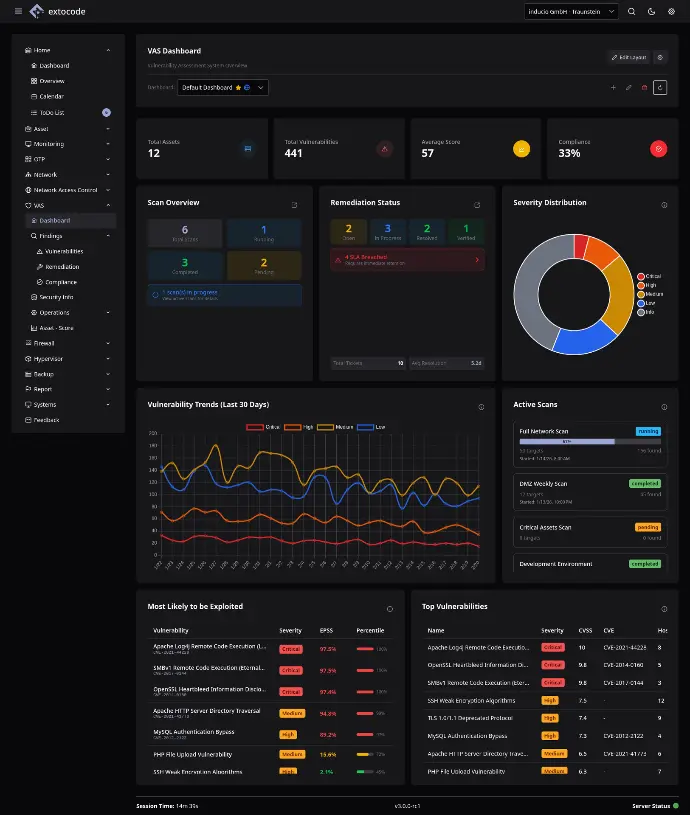
Highlights in COD 3.0
- Dark Mode by default + new UI design
- Global Search (Ctrl+K) across Network & Firewall
- New certificate module (PKI) incl. CA management and client certificates
- Ansible bulk port rollout for significantly faster deployments
- NAC performance boost (MAC exact match) + FreeRADIUS control directly in the UI
- Port counting for billing/reporting
General & User Interface
- Dark Mode is now the default (toggle in the top bar).
- New UI design with an updated color palette (incl. the Petwinkel color from the old COD).
-
Color configurator in the User Settings:
- Users can choose their own accent color.
- Stored in the database (across devices and sessions).
- Wide Mode as an additional layout option.
-
Global Search replaces the sidebar search:
- Open via Ctrl+K or the magnifier icon
- Currently searches in parallel across Network and Firewall (more modules to follow).
-
Backend status indicator (bottom right):
- Checks every 30 seconds: main backend, NAC, Backup
- Green: everything OK · Orange: NAC or Backup unreachable · Red: main backend unreachable
- Note: after switching sites, orange may briefly appear → approx. 30 seconds wait.
- New loading animation.
-
Session handling: Closing the app now performs a clean exit.
Settings
- Settings are now split into:
- User Settings
- Admin Settings
- Database users: can additionally change their password.
(AD password changes are deliberately not offered to avoid unintended AD modifications.)
- Active Directory users: reset or re-create OTP (in their own settings).
Dashboard
- No major changes in this release.
- Outlook: in the next update, the view will switch from "current calendar month" to the last 30 days instead.
OTP
- New copy function:
- select an OTP entry → Copy → adjust fields → Save
- Result: a new entry with a random secret based on the copied configuration
Network
- Blacklist works correctly again.
-
Discovered Windows devices: new view for automatically detected Windows machines
- click to show details
- Devices that monitoring did not find are highlighted in red .
- Management interface filtering is available for blacklisted connections.
Network Calculator
- Split into Basic and Advanced.
- IP space can be stored in the User Settings.
- Note: validation by the team is required.
Ansible
- Bulk port rollout:
- For e.g. 48 ports, a single rollout command is generated (e.g. interface port config 1/0/1–1/0/48)
- No more port-by-port deployment
-
Zones:
- Resync button added
- Moving devices between zones is present but disabled (risk of incorrect moves → config damage)
- Ansible logs: Raw JSON replaced with formatted, readable output.
- Runner: The runner ID is visible in log entries; a runner detail view is planned.
NAC
- Filter overhaul:
- Equals by default
- Per-field toggle to Contains (wildcard)
- Filters are applied only after pressing Enter
- Optimized MAC address lookup:
- Detects a complete MAC → automatic switch to exact match
- Significant performance improvement on large databases (e.g. 7M+ entries)
- Certificate-based authentication:
- Toggle between MAC- and cert-based auth
- Certificates can be assigned per VLAN
- NAS devices:
- New filter
- Creating one automatically triggers a service restart (no more SSH required)
- RADIUS service control in the UI:
- Start/Stop/Restart
- Live status and uptime
- Optional auto-refresh for log streaming
- Service permissions (ACL):
- The app user can manage FreeRADIUS and write to certificate directories without further system privileges.
- The app user can manage FreeRADIUS and write to certificate directories without further system privileges.
Certificates
-> New module
- CA management:
- Create CAs, view details (validity/status), deactivate
- Deletion is only possible if no client certificates have been issued
-
Client certificate creation:
- Select a CA
- Optionally override the hash algorithm
- Set your own key pair
- Add SANs (default values pre-filled)
- PKCS#12 download available for client certificates.
- Server certificates (e.g. FreeRADIUS) are automatically deployed to the RADIUS server → no download button.
-
Auto-discovery:
- FreeRADIUS detects new CAs automatically and restarts
- Note: a brief uptime reset when adding a new CA is normal
- CSV import for certificates is supported.
Firewall
- The Captive Portal has been moved into the Firewall section.
- Importing nested objects/zones from multiple sources was not implemented (conflicts caused by deep nesting).
Workaround: create the parent structure first, then add the child elements manually.
Hypervisor
- Largely rewritten
- Functional behavior is unchanged.
- Please test thoroughly in production-like environments.
Backup
- Comparison function improved:
- Clicking the right entry no longer automatically selects the left one (and vice versa)
- Cross-device comparison is now possible
- CSV import and tab selection are unchanged.
- Tip: view the expected CSV structure by exporting existing data.
- Tip: view the expected CSV structure by exporting existing data.
Logs
- Auto-refresh added (optional: refresh every second).
- ANSI color codes are stripped from log output (significantly reduces file size).
Config
- Backend, NAC, and Backup configurations are editable and trigger a service restart with live progress (status check every second).
- A "test database connection" button is planned but not yet implemented.
- The LDAPS toggle now also controls TLS for the AD backend connection (LDAPS off → TLS fully off).
- API key storage has been moved from the config file into the database.
Manager Features
- OTP reset by managers: the user view now has an "OTP reset" button.
- Manual DB resets by the development team are no longer necessary.
Port Summary & Billing
- New port counting (for billing/reporting):
- display active ports
- export active ports
- no more manual counting required
Bug Fixes
- Fix: password re-encryption on edit (had previously broken authentication afterward).
- Fix: blacklist did not work correctly.
- Fix: various UI sizing inconsistencies (Chrome/Windows/Linux).
- Fix: renaming bug from an earlier issue (if it reoccurs, please open a new issue).
- Additionally: numerous smaller bug fixes across all modules.